We talked about controlling Modulino from DUELink modules ( Arduino Modulino ) by switching the Downlink connector to I2C mode. Of course you can do the same with Sparkfun Qwiic, Adafruit STEMMA, and such…
A question came up: “How can I do the same but using MicroBlocks instead of using internal scripts or languages like Python?” Well, DUELink is very flexible that there is almost a way to do anything!
Let’s get into the details: The Downlink connector on DUELink modules is not I2C! Yes, yes there is a way to switch it to “I2C Mode” to help you out but it is not the default or the main use. However, when loading MicroBlocks firmware, you are bound by what MicroBlocks offers, but using Downlink as I2C is not one of the options in MicroBlocks.
Here is where things get very interesting! MicroBlocks include “DUELink Daisylink” library that has an easy way to send commands to downlink. Those commands can control a tethered DUELink module that you in turn its downlink into a “I2C Mode” we talked about earlier.
[MicroBlocks module] → [gateway moudle] → [Modulino]
In my setup, I have:
[DueSTEM] → [Ghizzy] → [Modulino LED]
Just like we controlled it here using this code:
DLMode(5,0)
Dim B1[32]
for _a in range (0,32,4)
  b1[_a]=0xe0 | 25
  next
b1[5]=0
b1[6]=100
b1[7]=100
DLI2CWr(54,b1,[])
We can now set b1 array (the colors) from MicroBlocks
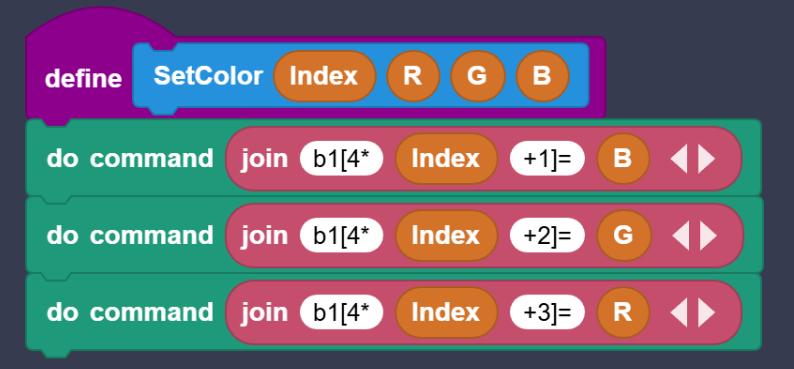
And then show the colors on LEDs by sending the buffer over I2C.
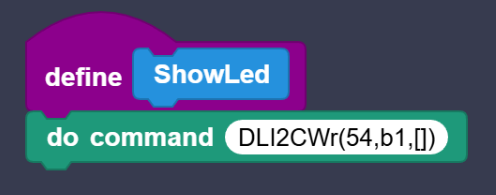
This example shows a hybrid model of how a DUELink module (Ghizzy in this case) can init an array and get things ready
DLMode(5,0)
Dim B1[32]
for _a in range (0,32,4)
  b1[_a]=0xe0 | 25
  next
And then commands coming to it (coming into Ghizzy) can set variables/arrays and execute commands (like send I2C data on Downlink).
DueSTEM in this example is running MicroBlocks firmware, where Ghizzy is running DUELink firmware. This hybrid model can do some very interesting things, just like we did here.
PS: You could implement software I2C in MicroBlocks to control the Downlink connector and you would not need a “gateway” but we wanted to show a hybrid model here.