My SC20100S dev board is no longer recognized by Device Manager. My Fez Stick is recognized however and TinyCLR Config sees it. I have reset the board by holding down the Reset button for 15 seconds with no luck. It did work when I first got it. Any ideas or is the board bricked (hope not).
Have you tried running it in bootloader mode by holding down the button?
EDIT: These things don’t brick easily.
The LDR button puts the board into loader mode (version 2.1.3) on COM3 but that does not allow any VS debugging. In loader mode, I am able to update the firmware via TinyCLR Config.
Resetting the board (holding the Reset button while power up for 15 seconds) does reset the board but still no SC20100S driver gets loaded when powering up with no buttons.
I tried other USB cables with the same result.
The FEZ Stick works fine on the same USB cable, powering up with the SC20100S driver.
Sounds like communication with the device is working; so it’s not hardware. And you removed the application from it right?
Next try reinstalling the drivers.
Ok, here is what I did.
Uninstalled the SC0100 device drivers from Device Manager.
Uninstalled TinyCLR Config.
Rebooted the computer.
Installed TinyCLR Config.
Plugged in the dev board and nothing.
Reset the dev board and plugged it in again and nothing.
Plugged in my FEZ Stick and SC0100 showed up in Device Manager and in TinyCLR Config.
Plugged in the dev board and nothing.
I think the board is fine as long as you can still connect to the bootloader.
Somehow, your C# code gets stuck and causes the device to lock up.
Updating the firmware is not enough, because your C# code is still there.
When you connect to the bootloader, use Erase All first.
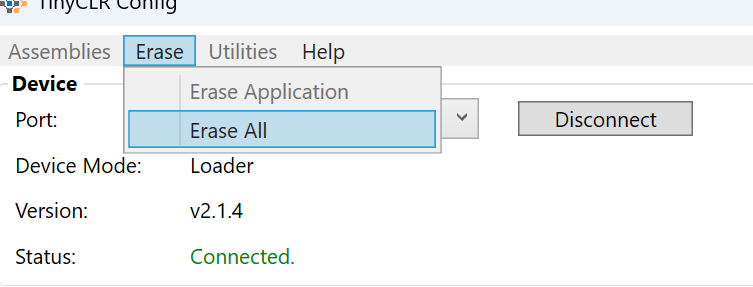
Then re-flash firmware again.
That did it (Erase All). Thank you very much.
2 Likes
Glad it works.
Just additional information: there is a button (or pin) called APP. That pin is designed for this purpose. Holding this button down (or pulling the pin low) will prevent the user application code from running, allowing you to deploy a new application without using Erase All.
Use this feature next time; it will help you resolve the issue faster.