I have tried the web based console, installing drivers, running DUELink Programmer locally and tried MicroBlocks. Nothing seems to be able to identify that the DUELink Stamp is connected. What am I missing?
And just to expand on this.
I have tried MSFT Edge and Google Chrome as browsers. The DUELink devices all have their stat lights on.
Issue fixed
Needed to use a USB C to USB C cable.
What was the issue exactly?
And glad you found and fixed it.
I was using a USB-A to USB cable. Switched to USB-C to USB-C and it seems to be working now. The downside is the laptop I was planning to use here does not have USB-C on it and so now I am trying to figure out what I am going to do.
1 Like
Please note that you may use USB charger cable only.
Not entirely sure what you mean by that. The cable in question has all 4 wires, meaning data and power.
But I am running into a different issue now which is that the sample for the Temp an sensor is returning 0 in MicroBlocks. Still trying to figure out if things are working ok.
If the cable has all wires then it would work. Is the device manager showing unknown device for both firmware and for DFU? I am curious. I mean if you erase your device using loader, will it also show unknown device?
Now to your other question, can you control user led (stat led) using MicroBlocks? I would start with that.
So I can control the stat light on the stamp. I am not entirely sure what is causing it to control that light versus the stat light on the Temp An.
So what I have right now is Select device 1, set user LED on, loop, set user LED off, loop again back on…. What I am seeing is the the Temp AN sensor LED always stays on. It does not seem to matter what I select the device to, the user LED only ever affects the Stamp.
Aha, I think I know. The user led block control the local led, regardless of select. It has nothing to do with tethered modules on downlink.
To control devices downlink, you select and send a command downlink to the connected devices. This is unrelated to doing anything on the device itself. See tethering modules here MicroBlocks | DUELink
The default do command block has statled() command in it.
Ok, so I have a select device (1). a do command statled(100,100,10). I would expect the stat light on the first thing in the bus to pulse 10 times at an interval of 100 milliseconds. Nothing actually happens.As a side note, at some point, the LED on the temp an sensor turned itself off. Not sure how that happened.
Hardware setup Stamp → Temp An
The led is on on power up as an indication of the module being ready. Then the led turns off when it receives the first command, which means it is enumerated.
Do you have a USB hook? If you do, can you quickly connect your temp an module to a PC and do a firmware/driver update?
By the way, if you do not have USB Hook, you an update Temp An via Stamp. Chain both and do “chain update” DUELink Update
Is there a way to update it with the Microblocks installed? Or do I need to erase all, load the DUELink firmware, update the chain and then load the Microblocks onto the stamp?
MicroBlocks can’t do “chain update”. One way to think of it is that once a board is loaded with MicroBlocks firmware it is no longer a “DUELink device”. It is just like a micro:bit or Arduino board running MicroBlocks.
The good news is you will very rarely need to do updates.
Ok, so here is where I am.
I switched to Python because I want to make sure I am not running into issues with MicroBlocks platform.
Went to loader, erased all, Loaded the DUeLink firmware and updated the chain.
Opened Visual Studio and created a new Python Application. Installed the DUELink pip package.
Loaded the temp driver using the console.
Still got 0 as the output.
Went back to the console to see what the driver region had and it was missing the temp driver. Put it back in and now it seems to be reading the temp correctly.
On the driver for the Temp AN sensor it has this.
fn ReadTemp()
    # Adjust to DueSTEM
    # TempAn ReadVCC() is 3.0V, DueSTEM: 3.29V
    # VRead() return 3.7% higher than DueSTEM

    v = VRead(1)
    v = v - (v*3.7/100) # adjust 3.7%

    # Fixed to 3.29
    return v/(3.29 )*100
fend
Where did the 3.29 come from? I am asking because when I do the math on my end, removing the divide by 3.29 gives me what appears to be an accurate temperature, around 13-14 Celsius. But leaving it in I am getting 4 Celsius. My basement is a bit chilly right now so I could believe it is 13-14 Celsius right now.
We will check.
You can also read the pin directly using vread(1), just to give you idea of options. Using ReadTemp() is recommended of course.
If you can run python, I think you can run Console as well, try this, from console.duelink.com, you should have same or similar what I have
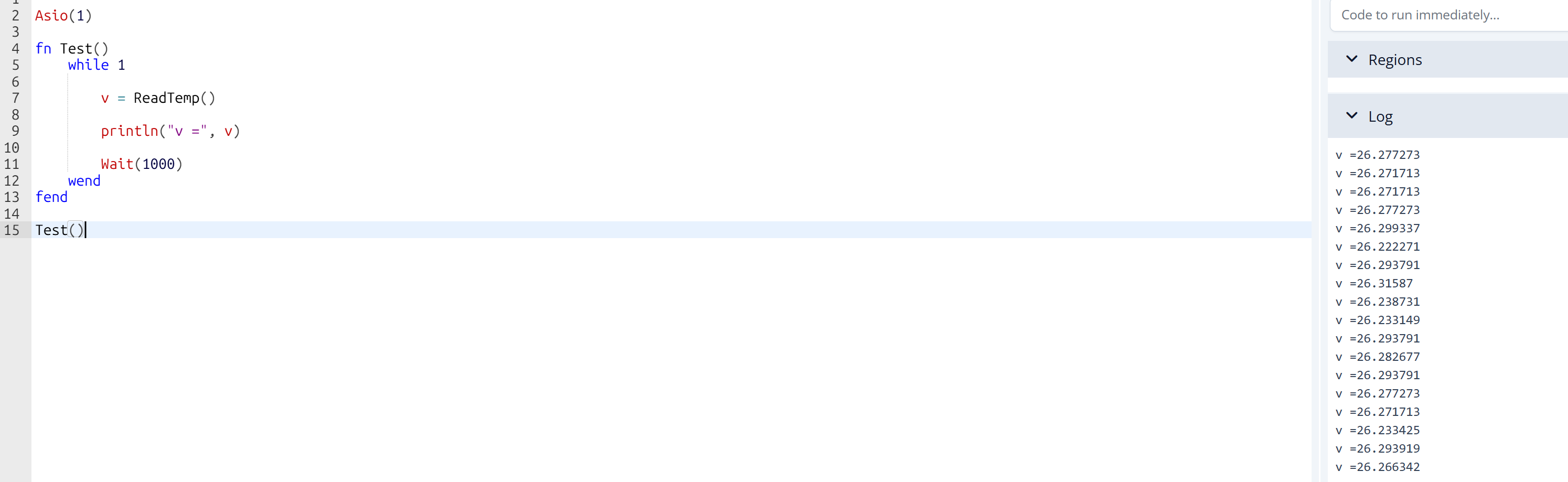
3.29 is ReadVCC, on DueSTEM: when call ReadVCC() it is 3.29.
On TempAn, it is 3.0. We did some adjustment between DueSTEM and TempAn.
I don’t want to drive you to detail, reading is 0 mean something wrong with command or setup, not because of 3.29.
Try console.duelink.com, paste code below:
```
Asio(1)

fn Test()
    while 1

        v = ReadTemp()

        println("v =", v)

        Wait(1000)
    wend
fend

Test()
it should not be zero