I think this needs aread() and not vread() since vread uses the internal micro’s voltage reference to read a calibrated voltage. In this case the analog chip uses the source voltage as refrerence.
To read the temperature in MicroBlocks you need to update to MicroBlocks firmware v384 or later. Then, open the MicroBlocks editor ( MicroBlocks ). Click on the “Add Library” button and add the “Basic Sensors” library. Click the “temperature” block to get the appropriate temperature:
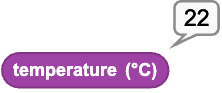
That block reads the temperature sensor built into the STM32 processor, so it picks up some of the waste head from the processor. Also, those temperature sensors vary slightly from chip to chip. That said, it should be within a few degrees of the actual temperature. You compare it to a known thermometer to figure out an offset for your particular board and then you can get fairly accurate readings over a range from about -15 to 50 C. (I’ve checked it in my refrigerator and freezer as well as at room temperature.)
2 Likes
Note: The above gives you the temperature on any DUELink board that is running MicroBlocks (e.g. the Stamp). It does not use a DaisyLinked temperature module. Of course, a DaisyLinked temperature module such as the Temp AN or Temperature and Humidity (DHT22) module will give you more accurate temperature readings.
2 Likes