Although I have used TinyCLR before I am using the UI features for the first time.
I am developing on the SCM20260D dev board with the final target being the FEZ Portal.
I have a logo that I want to put in a Stackpanel but I cannot find a way to do it.
I have read through many forum posts but none seem to cover this topic. In the code below I have an element called ‘LogoHolder’ which is currently just a rectangle as a placeholder but I want to replace it with an image of the same size.
I have looked at the ‘GHIElectronics.TinyCLR.UI.Media.ImageSource’ property but I can’t get it to work without the error:
Cannot implicitly convert type ‘System.Drawing.Bitmap’ to ‘GHIElectronics.TinyCLR.UI.Media.ImageSource’
Any help would be much appreciated
Thanks
private static UIElement Elements(DisplayController display)
{
var panel = new StackPanel(Orientation.Vertical);
panel.HorizontalAlignment = HorizontalAlignment.Left;

//Load logo and fonts to be used
var image = Resources.GetBitmap(Resources.BitmapResources.FBBLogo);

var font10pnt = Resources.GetFont(Resources.FontResources.droid_reg10);

var LogoHolder = new GHIElectronics.TinyCLR.UI.Shapes.Rectangle
{
    Width = 184,
    Height = 28,
    Fill = new SolidColorBrush(Colors.Red),
    HorizontalAlignment = HorizontalAlignment.Left,
};

var separator = new GHIElectronics.TinyCLR.UI.Shapes.Rectangle
{
    Width = display.ActiveConfiguration.Width,
    Height = 10,
    Fill = new SolidColorBrush(Colors.White),
    HorizontalAlignment = HorizontalAlignment.Left,
};

var txt = new TextBox
{
    Font = font10pnt,
    Text = "AQ: 100%",
    Foreground = new SolidColorBrush(Colors.Gray),
    Height = 20,
    Width = 100,
    HorizontalAlignment = HorizontalAlignment.Left,
    VerticalAlignment = VerticalAlignment.Center,
    BorderThickness = 0
};

panel.Children.Add(LogoHolder);
panel.Children.Add(separator);
panel.Children.Add(txt);

return panel;

}
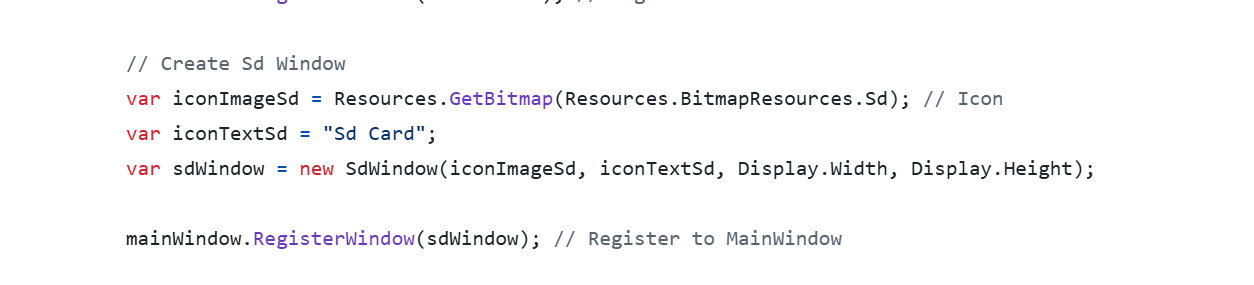
It does. We loaded many icons (images), for example the SD icon. That is a general case, so you will see some middle classes, but in the end, you will see how we add images to the UI
I understand this but this does not put that image into a panel or other UI Element. If I have a Stackpanel with textboxes, buttons and other elements how do I also include an image?