Is there a way to deploy to devices from the command line using PowerShell?
Is there a hook from the GHI libraries that Visual Studio uses? I would like it if Claude code could test the hardware autonomously.
Is there a way to deploy to devices from the command line using PowerShell?
Is there a hook from the GHI libraries that Visual Studio uses? I would like it if Claude code could test the hardware autonomously.
Well, I decompiled the library and fed it to Claude. It inspected the code and crafted powershell files to call the library to deploy from the command line..
<#
debug-tinyclr.ps1
.SYNOPSIS
    Connect to a TinyCLR device and stream Debug.WriteLine output, with optional deploy.

.DESCRIPTION
    Headless replacement for VS's F5 workflow. Loads the GHI TinyCLR debugger
    DLL from the installed VS extension, enumerates ports via MFDeploy,
    connects, and streams Debug.WriteLine — optionally deploying a folder of
    .pe files first.

    Requires:
      - Windows PowerShell 5.1+ (or pwsh)
      - Visual Studio with the "GHI Electronics TinyCLR" extension installed

.PARAMETER PeDir
    Folder containing .pe files to deploy. Omit for monitor-only mode.

.PARAMETER Transport
    Filter ports by transport: Serial, USB, or TCPIP. Default: no filter.

.PARAMETER Monitor
    When combined with -PeDir, reconnect after the post-deploy reboot and
    keep streaming Debug.WriteLine.

.PARAMETER ProjectUserFile
    Optional .csproj.user file to pick up DeployTransport / DeployDevice
    from. If not given, the script walks the parent of the script dir for
    any *.csproj.user and uses the first match.

.EXAMPLE
    .\debug-tinyclr.ps1
    .\debug-tinyclr.ps1 -PeDir bin\Debug\pe -Monitor
#>
param(
    [string]$PeDir,
    [ValidateSet('Serial','USB','TCPIP')]
    [string]$Transport,
    [switch]$Monitor,
    [string]$ProjectUserFile
)

. (Join-Path $PSScriptRoot '_find-tinyclr-ext.ps1')
$ext     = Find-TinyClrExtension
$dllPath = $ext.DebuggerDll
$extDir  = $ext.ExtDir
Write-Host "TinyCLR extension: $extDir"

# Resolve sibling DLLs that Add-Type won't find on its own.
# The re-entrance guard (HashSet) prevents LoadFrom() from recursing back into
# this handler for the same assembly it's already in the middle of loading.
$global:_asmResolving = [System.Collections.Generic.HashSet[string]]::new(
    [System.StringComparer]::OrdinalIgnoreCase)

[System.AppDomain]::CurrentDomain.add_AssemblyResolve({
    param($src, $e)
    $name = $e.Name.Split(',')[0]
    # Return already-loaded assembly immediately — no LoadFrom needed.
    $loaded = [System.AppDomain]::CurrentDomain.GetAssemblies() |
              Where-Object { $_.GetName().Name -eq $name } |
              Select-Object -First 1
    if ($loaded) { return $loaded }
    # Re-entrance guard: if we're already loading this name, bail out.
    if (-not $global:_asmResolving.Add($name)) { return $null }
    try {
        $path = Join-Path $extDir ($name + '.dll')
        if (Test-Path $path) { [System.Reflection.Assembly]::LoadFrom($path) }
        else { $null }
    } finally {
        $global:_asmResolving.Remove($name) | Out-Null
    }
})

Add-Type -Path $dllPath

# A real CLR static method for the deploy MessageHandler delegate. A
# PowerShell scriptblock wrapped as Action<string> gets invoked on Engine's
# worker thread and blows the PS runspace stack. This stays on the calling
# thread's normal Console.Out path.
Add-Type -TypeDefinition @"
using System;
using GHIElectronics.TinyCLR.Debugger.Management;
public static class DeployLog {
    public static void Write(string msg) { Console.WriteLine("  [deploy] " + msg); }
    public static void OnDebugText(object sender, DebugOutputEventArgs e) {
        Console.Write(e.Text);
    }
}
"@ -ReferencedAssemblies $dllPath

# Pick up DeployTransport / DeployDevice from a .csproj.user file. Explicit
# -ProjectUserFile wins; otherwise fall back to the first match under the
# script's parent directory, which is the usual layout (scripts/ next to the
# project folder). Either way, -Transport on the command line overrides.
if (-not $ProjectUserFile) {
    $ProjectUserFile = Get-ChildItem -Path (Join-Path $PSScriptRoot '..') `
        -Filter '*.csproj.user' -Recurse -File -ErrorAction SilentlyContinue |
        Select-Object -First 1 -ExpandProperty FullName
}
if (-not $Transport -and $ProjectUserFile -and (Test-Path $ProjectUserFile)) {
    [xml]$userXml = Get-Content $ProjectUserFile
    $ns  = @{ ms = 'http://schemas.microsoft.com/developer/msbuild/2003' }
    $t   = (Select-Xml -Xml $userXml -XPath '//ms:DeployTransport' -Namespace $ns).Node.InnerText
    $dev = (Select-Xml -Xml $userXml -XPath '//ms:DeployDevice'    -Namespace $ns).Node.InnerText
    if ($t) {
        $Transport = $t
        Write-Host "Project settings ($([IO.Path]::GetFileName($ProjectUserFile))): transport=$Transport device=$dev"
    }
}

$mfdeploy = New-Object GHIElectronics.TinyCLR.Debugger.Management.MFDeploy

# Enumerate ports, optionally filtered by transport.
if ($Transport) {
    $transportEnum = [GHIElectronics.TinyCLR.Debugger.Management.TransportType]$Transport
    $ports = $mfdeploy.EnumPorts($transportEnum)
} else {
    $ports = $mfdeploy.EnumPorts()
}

if ($ports.Count -eq 0) {
    $mfdeploy.Dispose()
    throw "No TinyCLR device found. Is the device plugged in and not held by VS?"
}

Write-Host "Available ports:"
$ports | ForEach-Object { Write-Host "  $($_.Name) [$($_.Transport)]" }

# If the project specified a device name, prefer it; otherwise take the first.
$targetPort = $ports[0]
if ($dev) {
    $match = $ports | Where-Object { $_.Name -like "*$dev*" } | Select-Object -First 1
    if ($match) { $targetPort = $match }
}

$device = $mfdeploy.Connect($targetPort)
Write-Host "Connected to: $($targetPort.Name)"

# OnDebugText is EventHandler<DebugOutputEventArgs>. A PS scriptblock here
# blows the stack when fired from Engine's worker thread (same failure mode
# as the deploy MessageHandler), so bind a compiled CLR handler instead.
$dbgDelegate = [System.Delegate]::CreateDelegate(
    [System.EventHandler[GHIElectronics.TinyCLR.Debugger.Management.DebugOutputEventArgs]],
    [DeployLog].GetMethod('OnDebugText'))
$device.add_OnDebugText($dbgDelegate)

# OnProgress is a custom delegate (OnProgressHandler), not EventHandler<T>,
# so Register-ObjectEvent is required - scriptblock-as-delegate won't bind.
$progressJob = Register-ObjectEvent -InputObject $device -EventName OnProgress -Action {
    $value  = $Event.SourceArgs[0]
    $total  = $Event.SourceArgs[1]
    $status = $Event.SourceArgs[2]
    if ($total -gt 0) {
        $pct = [int](($value / $total) * 100)
        Write-Progress -Activity "Deploying" -Status $status -PercentComplete $pct
    }
}

try {
    if ($PeDir) {
        # Managed-app deploy: load all .pe files from the folder and push them
        # via Engine.Deployment_Execute(List<KVP<string,byte[]>>).
        # MFDevice.Deploy(byte[]) is for raw SREC/TinyBooter images - not what we want.
        $resolvedPeDir = Resolve-Path $PeDir
        $peFiles = Get-ChildItem -Path $resolvedPeDir -Filter '*.pe'
        if ($peFiles.Count -eq 0) { throw "No .pe files found in: $resolvedPeDir" }

        Write-Host "Deploying $($peFiles.Count) assemblies from $resolvedPeDir ..."

        $assemblies = New-Object 'System.Collections.Generic.List[System.Collections.Generic.KeyValuePair[string,byte[]]]'
        foreach ($f in $peFiles) {
            $bytes = [System.IO.File]::ReadAllBytes($f.FullName)
            $kvp   = [System.Collections.Generic.KeyValuePair[string,byte[]]]::new($f.Name, $bytes)
            $assemblies.Add($kvp)
        }

        $engine = $device.DbgEngine
        if ($engine -eq $null) { throw "DbgEngine is null - device not in CLR mode?" }
        Write-Host "Engine connected: $($engine.IsConnected)  source: $($engine.ConnectionSource)"
        Write-Host "Incremental deployment: $($engine.Capabilities.IncrementalDeployment)"
        Write-Host "Assembly list count: $($assemblies.Count)"
        $assemblies | ForEach-Object { Write-Host "  $($_.Key)  $($_.Value.Length) bytes" }

        # Deployment_Execute(list, eraseSectorsNotInAssembly, messageHandler)
        # The 1-arg overload passes null for messageHandler, which causes NRE in the
        # incremental path because mh() is called without a null check. Wrap an
        # Action<string> as the private MessageHandler delegate type via reflection.
        $mhType = $engine.GetType().GetNestedType(
            'MessageHandler',
            [System.Reflection.BindingFlags]'NonPublic,Public,Instance,Static')
        if ($mhType) {
            $mi = [DeployLog].GetMethod('Write')
            $handler = [System.Delegate]::CreateDelegate($mhType, $mi)
            $ok = $engine.Deployment_Execute($assemblies, $true, $handler)
        } else {
            Write-Warning "MessageHandler type not found via reflection - trying 1-arg overload (may NRE)"
            $ok = $engine.Deployment_Execute($assemblies)
        }
        Write-Progress -Activity "Deploying" -Completed
        Write-Host "Deploy result: $ok"
    }
    if ($Monitor -or -not $PeDir) {
        if ($PeDir) {
            # Device just rebooted - USB re-enumerates, current handle is stale.
            # Dispose and reconnect so OnDebugText picks up boot-time output.
            Write-Host "Waiting for device to re-enumerate after reboot..."
            $device.Dispose()
            Start-Sleep -Seconds 3
            for ($i = 0; $i -lt 20; $i++) {
                $ports2 = if ($Transport) { $mfdeploy.EnumPorts([GHIElectronics.TinyCLR.Debugger.Management.TransportType]$Transport) } else { $mfdeploy.EnumPorts() }
                if ($ports2.Count -gt 0) { break }
                Start-Sleep -Milliseconds 500
            }
            if ($ports2.Count -eq 0) { throw "Device did not re-enumerate" }
            $targetPort = $ports2[0]
            if ($dev) {
                $m = $ports2 | Where-Object { $_.Name -like "*$dev*" } | Select-Object -First 1
                if ($m) { $targetPort = $m }
            }
            $device = $mfdeploy.Connect($targetPort)
            $device.add_OnDebugText($dbgDelegate)
            Write-Host "Reconnected to: $($targetPort.Name)"
        }
        Write-Host "Monitor mode - streaming Debug.WriteLine (Ctrl+C to stop)"
        while ($true) { Start-Sleep -Seconds 1 }
    }
} finally {
    Unregister-Event -SourceIdentifier $progressJob.Name -ErrorAction SilentlyContinue
    $device.Dispose()
    $mfdeploy.Dispose()
}
and…
<#
_find-tinyclr-ext.ps1
.SYNOPSIS
    Locate the installed GHI TinyCLR Visual Studio extension at runtime.

.DESCRIPTION
    VS writes extensions to a path like
        %LOCALAPPDATA%\Microsoft\VisualStudio\<ver>_<id>\Extensions\<hash>\
    Both the version directory and the extension hash directory change across
    VS/extension updates, so hard-coding either breaks the moment either side
    upgrades. This helper globs for the Debugger DLL under every VS profile
    and picks the most recently written match — works across side-by-side VS
    installs and across extension reinstalls.

    Dot-source this file and call Find-TinyClrExtension to get back a hash
    with { ExtDir; DebuggerDll; MetadataProcessorExe }.
#>

function Find-TinyClrExtension {
    $roots = @(
        Join-Path $env:LOCALAPPDATA 'Microsoft\VisualStudio'
    )
    $candidates = foreach ($root in $roots) {
        if (-not (Test-Path $root)) { continue }
        Get-ChildItem -Path $root -Filter 'GHIElectronics.TinyCLR.Debugger.dll' `
            -Recurse -ErrorAction SilentlyContinue -File
    }
    if (-not $candidates) {
        throw "TinyCLR extension not found under $($roots -join ', '). Is the VS extension installed?"
    }

    # Prefer newest — survives reinstalls / updates cleanly.
    $best = $candidates | Sort-Object LastWriteTime -Descending | Select-Object -First 1
    $extDir = Split-Path $best.FullName
    $mmp    = Join-Path $extDir 'GHIElectronics.TinyCLR.MetadataProcessor.exe'

    [PSCustomObject]@{
        ExtDir               = $extDir
        DebuggerDll          = $best.FullName
        MetadataProcessorExe = if (Test-Path $mmp) { $mmp } else { $null }
    }
}
The compile didn’t workout to well. Claude has a question:
Subject: MetadataProcessor.exe -compile emits .pdbx but never the .pe (TinyCLR 2.4.0.1000)

Trying to reproduce the VS "Deploy" step headlessly so CI / scripts can push firmware updates without opening the IDE. I've reverse-engineered what looks like the right MMP invocation from strings in GHIElectronics.TinyCLR.VisualStudio.ProjectSystem.dll (-parse, -minimize, -importResource, -compile, -loadHints, -resolve), but -compile never writes the .pe file — only the .pdbx. MMP exits 0 with no diagnostic output.

Environment

VS 2022 17.x with the GHI TinyCLR extension installed
TinyCLR packages 2.4.0.1000
MMP at …\Extensions\<hash>\GHIElectronics.TinyCLR.MetadataProcessor.exe
Minimal repro (mscorlib alone, no other refs):

MetadataProcessor.exe -verbose -parse mscorlib.dll -minimize -compile mscorlib.pe
stdout:

Processing -parse mscorlib.dll
Processing -minimize
Processing -compile mscorlib.pe
Exit code: 0. Files written: mscorlib.pdbx (XML). Files NOT written: mscorlib.pe.

Same behaviour on the real project:

MetadataProcessor.exe -verbose \
  -loadHints mscorlib <path>\mscorlib.dll \
  -loadHints GHIElectronics.TinyCLR.Native <path>\…\Native.dll \
  … (17 more -loadHints, one per reference) \
  -parse MyApp.exe -resolve -minimize -compile pe\MyApp.pe
Exit 0, only pe\MyApp.pdbx written.

What I've tried

With and without -resolve
With and without -minimize
Output path with .pe extension, without extension, relative, absolute — only .pdbx ever appears
Separate working directory / output directory — same result
-verbose shows -compile is seen but emits no further log
Question

What invocation does the VS extension's Deploy action actually use to go from .exe → .pe? Is there a flag the public -compile help omits, a mandatory preceding step (-create_database?), or does the extension use a separate API rather than the command-line tool?

Happy to share the two PowerShell scripts I've got so far — one that deploys an existing pe/ folder via MFDeploy.Deployment_Execute (works great), and this stub that's supposed to generate the pe/ contents (doesn't).
<#
compile-pe.ps1
.SYNOPSIS
    Run GHIElectronics.TinyCLR.MetadataProcessor.exe to convert PowerStepCNC.exe
    to PowerStepCNC.pe. Mirrors the invocation VS's TinyCLR project system uses
    at deploy time (-parse -minimize -compile, with -loadHints for every ref).

.DESCRIPTION
    dotnet build / MSBuild only produces the .exe. The .pe (TinyCLR-native
    packed executable) is generated by MMP inside VS's Deploy action. This
    script reproduces that step so a headless rebuild + MFDeploy.Deployment_Execute
    can actually push updated code to the device.
#>
param(
    [string]$BinDir = "$PSScriptRoot\..\PowerStepCNC\bin\Debug"
)

. (Join-Path $PSScriptRoot '_find-tinyclr-ext.ps1')
$ext = Find-TinyClrExtension
$mmp = $ext.MetadataProcessorExe
if (-not $mmp) { throw "MetadataProcessor.exe not found in $($ext.ExtDir)" }
$binDir = Resolve-Path $BinDir
$peDir  = Join-Path $binDir 'pe'
if (-not (Test-Path $peDir)) { New-Item -ItemType Directory -Path $peDir | Out-Null }

$exe = Join-Path $binDir 'PowerStepCNC.exe'
$out = Join-Path $peDir  'PowerStepCNC.pe'

# Every referenced assembly needs a -loadHints entry so MMP can resolve types.
$refs = Get-ChildItem -Path $binDir -Filter '*.dll'
$args = @()
foreach ($r in $refs) {
    $args += '-loadHints'
    $args += [System.IO.Path]::GetFileNameWithoutExtension($r.Name)
    $args += $r.FullName
}
$args += @('-parse', $exe, '-resolve', '-minimize', '-compile', $out)

Write-Host "Running MMP ($($refs.Count) hints)..."
$p = Start-Process -FilePath $mmp -ArgumentList $args `
     -NoNewWindow -Wait -PassThru `
     -RedirectStandardOutput "$env:TEMP\mmp.out" -RedirectStandardError "$env:TEMP\mmp.err"

if ($p.ExitCode -ne 0) {
    Write-Host "MMP exit $($p.ExitCode)" -ForegroundColor Red
    Get-Content "$env:TEMP\mmp.err" | Write-Host
    Get-Content "$env:TEMP\mmp.out" | Write-Host
    exit $p.ExitCode
}

if (Test-Path $out) {
    $size = (Get-Item $out).Length
    Write-Host "OK: $out ($size bytes)"
} else {
    Write-Host "MMP exit 0 but $out was not created" -ForegroundColor Red
    Get-Content "$env:TEMP\mmp.err" | Write-Host
    Get-Content "$env:TEMP\mmp.out" | Write-Host
    exit 1
}
Wall of text aside, it’s progress!
Did you get it to fully deploy from Claude Code?
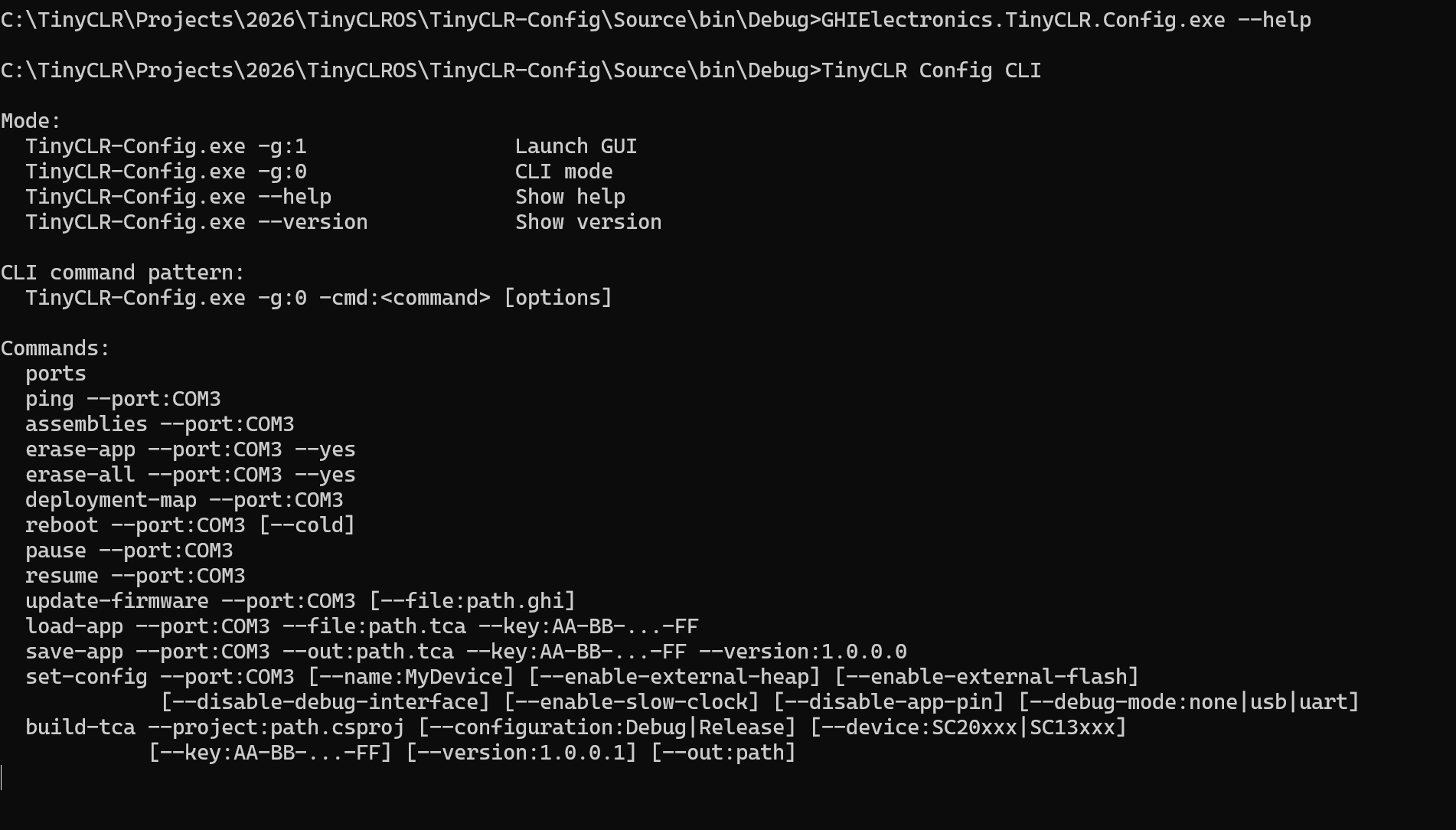
We are going to make TinyCLR Config to be command line. Let me know what style do you want we will look in next release which will be released soon.
TinyCLRConfig.exe -p path_to_project -d sc20260 ….
I think 2 different scenarios could be discussed.
command line to streamline the deployment of an existing app in a production-type environment. This has been added to Github as an improvement.
deployment for debugging while in Visual Studio. I believe this is somewhat of a new request since it involves closing the loop in the development cycle using an AI agent. Allow the agent, like Claude Code, to push the deployment and read the debug logs. At least that is my take on it. Maybe @Mr_John_Smith had something different in mind.
It can deploy but it can’t compile. I was also able to get it to listen to the debug output whilst interacting with the serial port to run tests on the system (serial on UART1).
TinyCLRConfig.exe -p path_to_project -d sc20260 ….
Yes, Gus, this looks fine; however, it would need a discovery method as well. The ability to list all detected devices. It is very likely I’ll have more than 1 plugged in. The Ability to recompile code will be a HUGE productivity win though.
Not just read the logs but..
It can output a powershell script that sniffs out what’s required from the debug outputs. No break point management or that stuff required. Its so fast at coding that it doesn’t really need true debugger features.
Hey Dat, I’m really interested into using this solution to generate a tca application file without hardware connected (in our CI/CD pipeline).
Do you have a beta we can try?
No, not yet, but soon
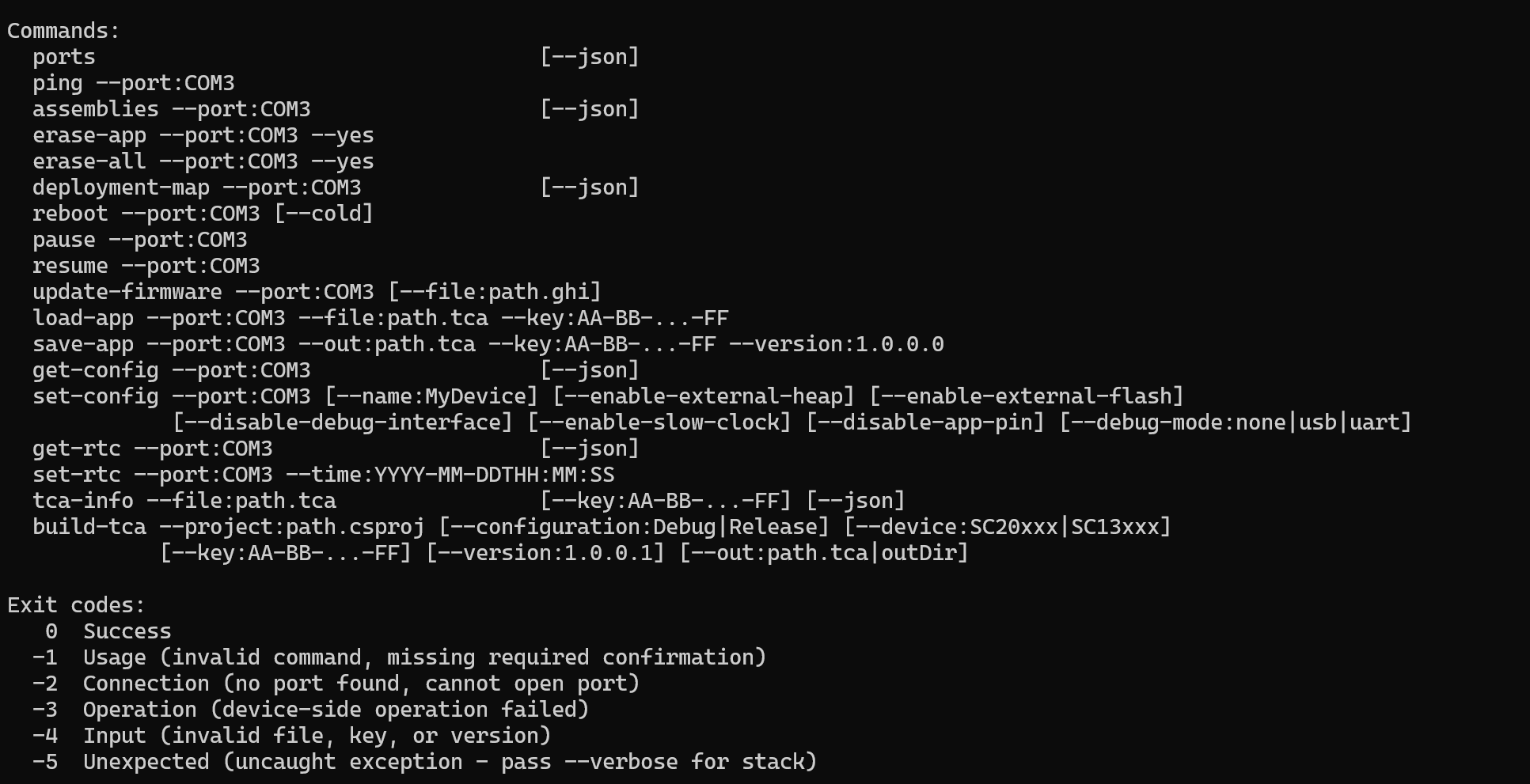
Exit codes — does each command return predictable non-zero on failure? Required for if ($LASTEXITCODE) { ... } in scripts.
--json output — ports, assemblies, deployment-map, and a hypothetical get-config are way easier to consume as JSON than parsed stdout.
get-config / read-config — there’s a set-config but no inverse. Can’t audit what’s actually flashed.
tca-info --file:path.tca — inspect a .tca offline (version, key fingerprint, target SoC) without a device. Useful in release pipelines (verify the artifact before shipping).
set-clock / set-rtc — small but real
The clock thing is a nice to have but get-config and a way to validate the tca files prior to flashing would help.
set-rtc is a really good features !