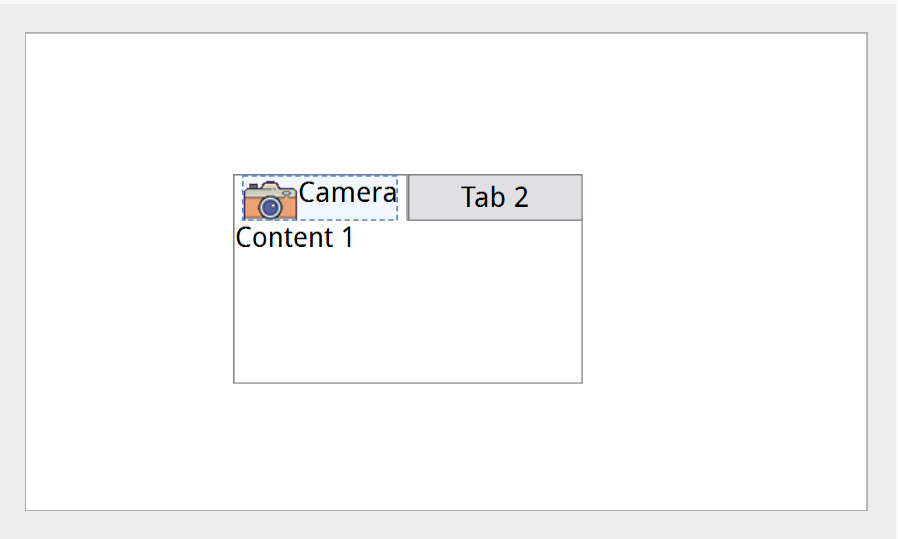
Is there a way to display image in header tab in tabcontrol instead of text only ?
We will add, anything else?
In Slider,
In slider, can we define track size ? You ask 
1 Like
This is WPF standard, so we will add.
This is not WPF standard, can’t get approval to add, sorry :d
you will need v3.0.1.5000 for this feature:
<Window Class="TinyCLRUIApplication7.MainWindow" Width="480" Height="272">
  <!-- This file is edited BOTH ways: the TinyCLR UI Designer writes your changes back here, and what you type
       here appears in the designer. Open it with View > Other Windows > TinyCLR UI Designer. Rebuild to
       regenerate MainWindow.tcui.g.cs (InitializeComponent). -->
  <Canvas Name="RootCanvas">
    <TabControl Name="TabControl1" Width="200" Height="120" SelectedIndex="0" Canvas.Left="118" Canvas.Top="80" TouchUp="TabControl1_TouchUp">
      <TabItem Header="">
        <TabItem.Header>
          <StackPanel Orientation="Horizontal">
            <Image Source="Camera" Width="32" Height="32" TransparentColor="0xFF00F2" Stretch="Fill" />
            <Text TextContent="Camera" />
          </StackPanel>
        </TabItem.Header>
        <Text TextContent="Content 1" />
      </TabItem>
      <TabItem Header="Tab 2">
        <Text TextContent="Content 2" />
      </TabItem>
    </TabControl>
  </Canvas>
</Window>
3 Likes