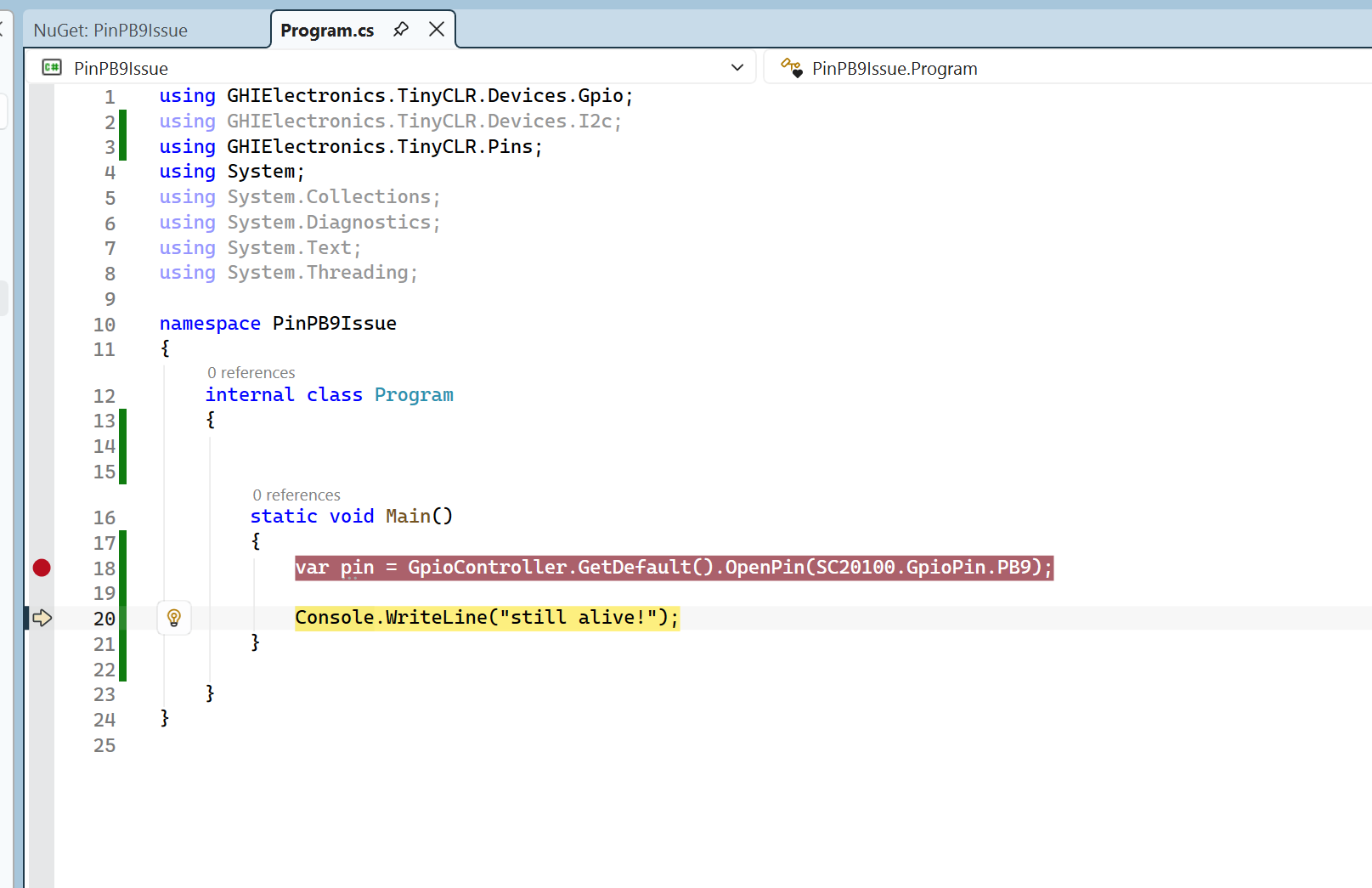
Hi,
I’m using TinyCLR 2.3.0.1000 on a FEZ Duino (SC20100).
My custom PCB connects limit switches to PB8 (pin 24) and PB9 (pin 25).
When I call GpioController.GetDefault().OpenPin(25) I get CLR_E_INVALID_OPERATION.
I2C1 seems to be reserved by TinyCLR at boot and is blocking these pins.
I2cController.FromName(SC20100.I2cBus.I2c1) also fails with Acquire error.
Is there a way to release I2C1 and use PB8/PB9 as GPIO in TinyCLR 2.3 ?
Looks like you found a problem and its source. We will look into it.
Does it happen on 2.4.0.1000?
I don’t think i2c is hold by default. Is there anything initialize before openning the pin?
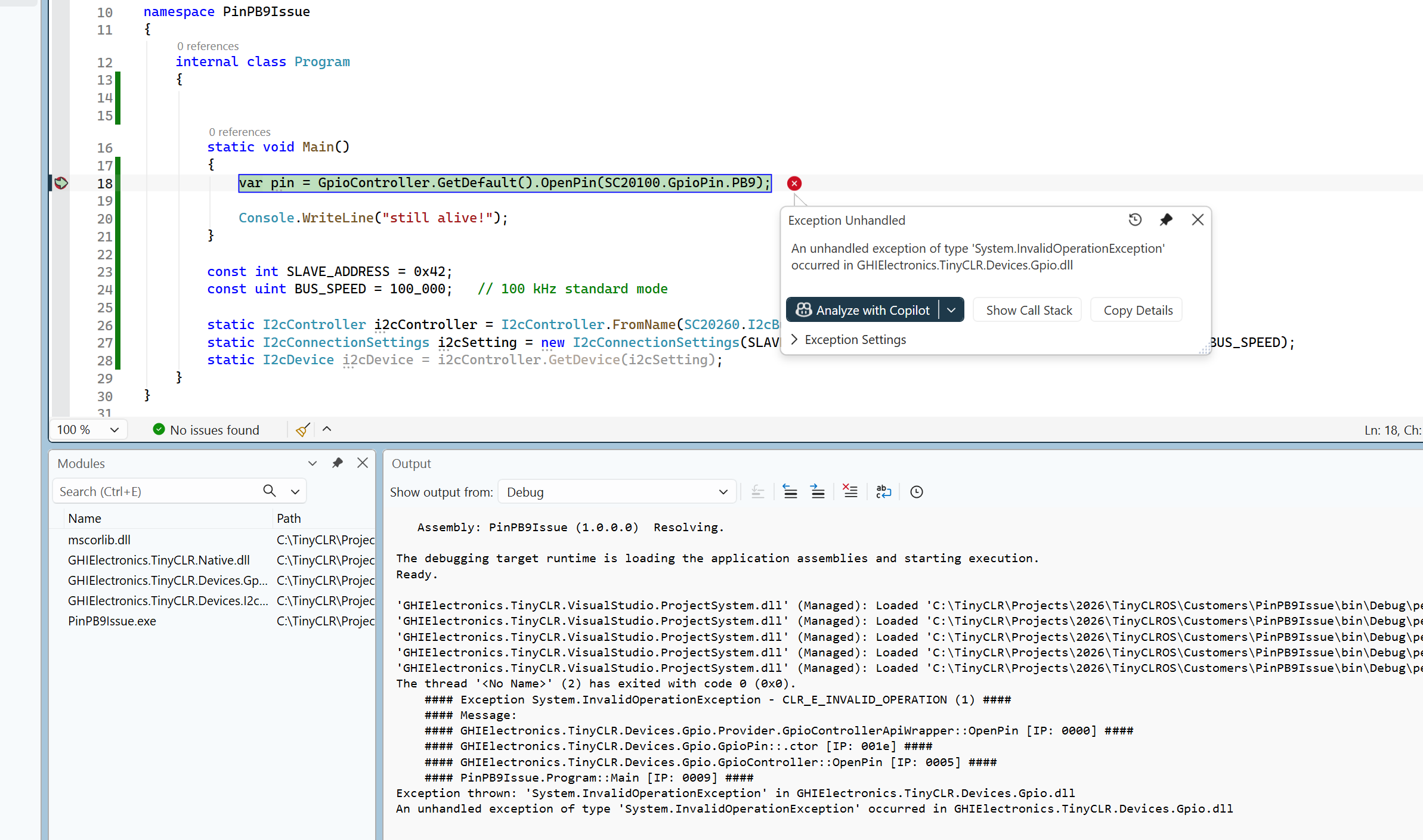
Yes, it happens even at the very beginning of Main(), before any initialization:
var pin = GpioController.GetDefault().OpenPin(SC20100.GpioPin.PB9);
This fails immediately with CLR_E_INVALID_OPERATION before anything else runs.
Nothing is initialized before this call.
We have not tested on 2.4.0.1000 yet.
Hi,
You are using TinyCLR 2.3, which is even older than 2.4. I originally thought you were using 3.0 and encountering this issue 
Anyway, I recommend upgrading to TinyCLR 3.0. I just tested it, and I didn’t encounter this issue.
If you prefer not to upgrade, you can try closing and reopening the pin. For example:
 var pin = GpioController.GetDefault().OpenPin(SC20100.GpioPin.PB9);

 GpioController.GetDefault().Provider.ClosePin(SC20100.GpioPin.PB9); //=>>>>> GHI added

 var pin2 = GpioController.GetDefault().OpenPin(SC20100.GpioPin.PB9);

 Debug.WriteLine($" pin2 is good? {pin2 != null}");
I tested this, and it works on TinyCLR 3.0.
Unfortunately, I can’t go back to TinyCLR 2.3 to verify whether PB9 is reserved by default or if something else is causing the issue.
Hello,
If I do the update, will it affect my existing code?
Most APIs are the same. Your project may require zero changes, or only minor ones. Give it a try.
At least version 3.0 fixes your issue, if this is a bug on v2.3
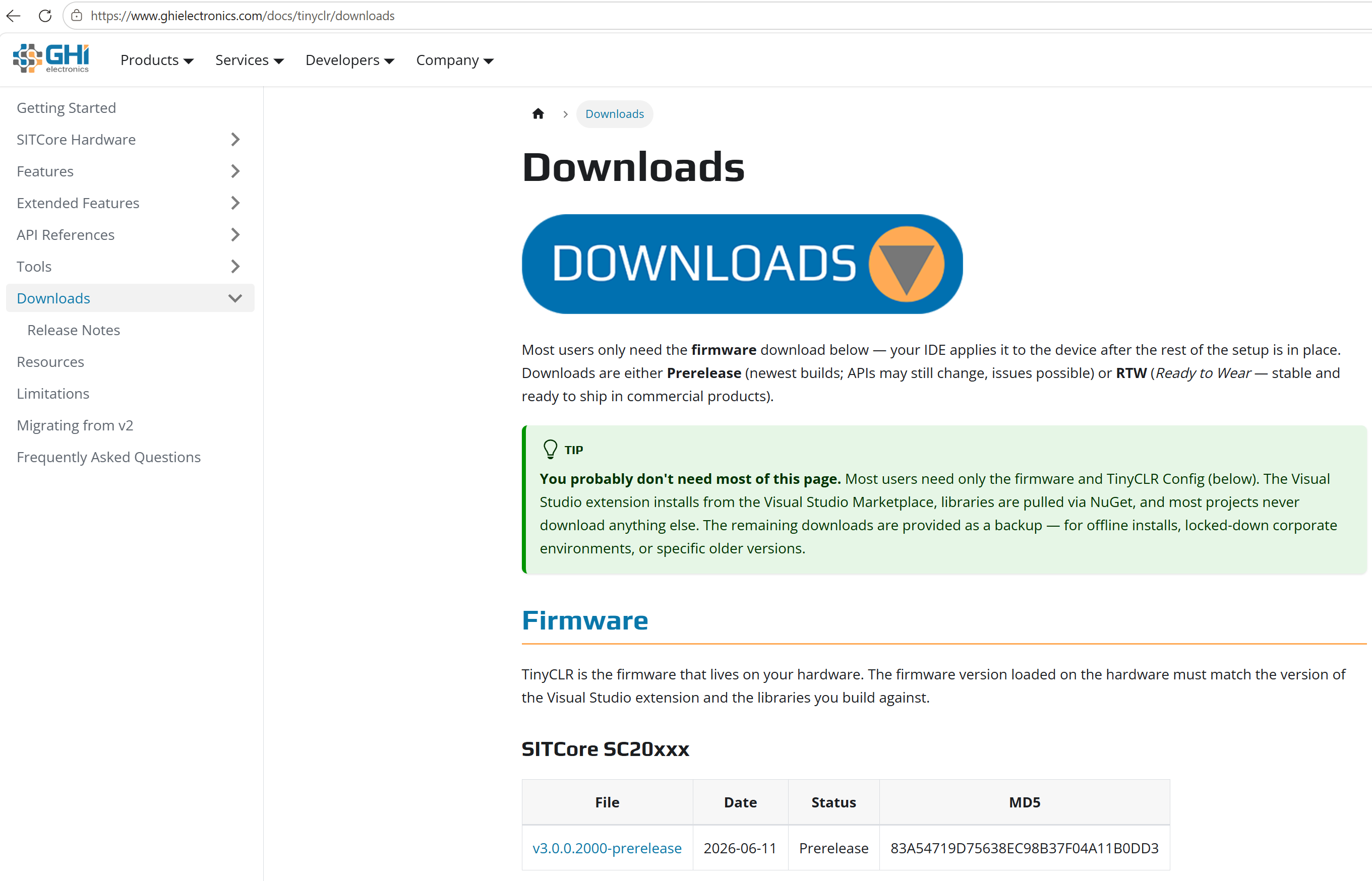
Hi, where can I download the TinyCLR 3.0.0.3000 firmware file for SC20100? I can’t find it on the downloads page. I have the VS extension 3.0.0.3000 and NuGet packages 3.0 but need the matching firmware .ghi file.
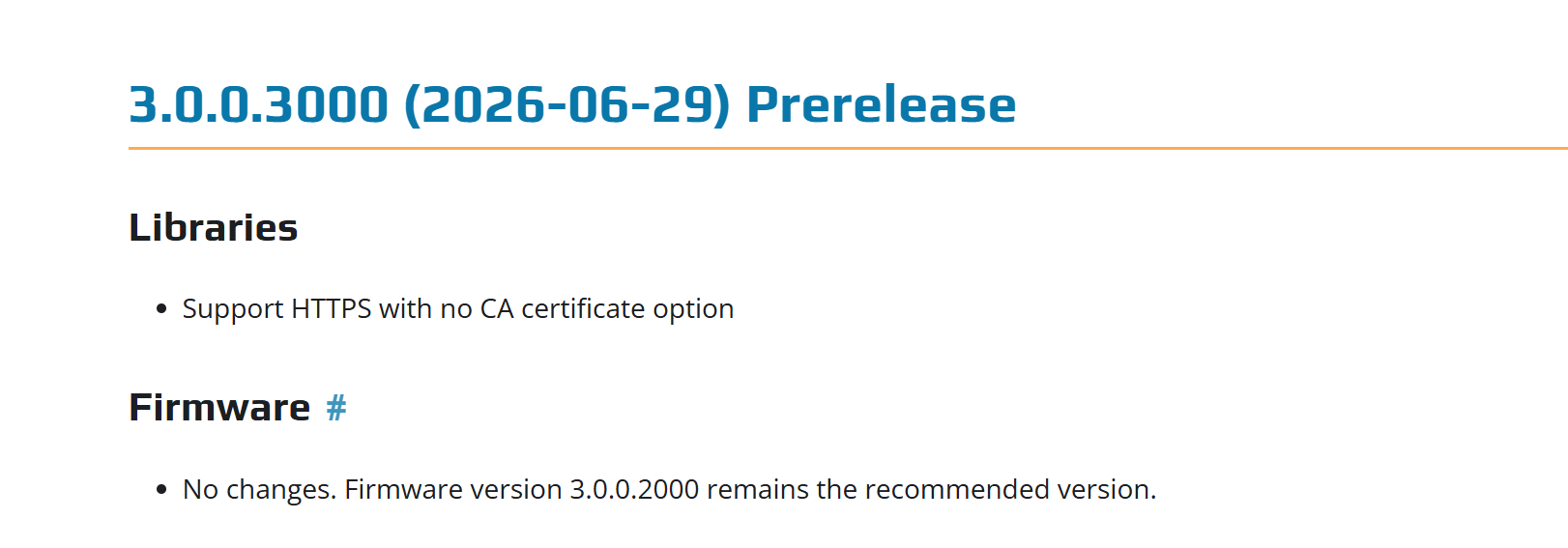
Hi, no need firmware 3.0.0.3000. The release note said that
Hi Dat_Tran, where can I download the firmware 3.0.0.2000 for SC20100? I can’t find it on the downloads page.
Hi Dat_Tran and Gus_Issa, thank you very much for your help and quick responses! After upgrading to TinyCLR 3.0, we are getting compilation errors: XmlReader and XmlWriter are inaccessible due to protection level. Has the XML API changed in TinyCLR 3.0? How should we use XmlReader and XmlWriter now?
Unfortunately, XML is one of the APIs that was updated to match standard .NET. I think you only need to:
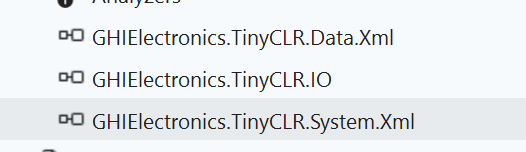
- Add the GHIElectronics.TinyCLR.System.Xml NuGet package.
- Change
using GHIElectronics.TinyCLR.Data.Xml; to using System.Xml; .
Then your code should work.
Here is a complete example showing how to use it in TinyCLR v3.
using System;
using System.IO;
using System.Text;
using System.Xml;   // XmlReader / XmlWriter  — NuGet: GHIElectronics.TinyCLR.System.Xml

namespace xml
{
    internal class Program
    {
        static bool allPass = true;

        public static void Main()
        {
            // ---------- WRITE ----------
            var ms = new MemoryStream();
            using (var writer = XmlWriter.Create(ms))
            {
                writer.WriteStartDocument();
                writer.WriteStartElement("config");
                writer.WriteAttributeString("version", "1");
                writer.WriteElementString("name", "FEZ Duino");
                writer.WriteEndElement();
                writer.WriteEndDocument();
            }   // v3.0: flushes, but leaves ms OPEN (standard .NET behavior)

            var xml = Encoding.UTF8.GetString(ms.ToArray());
            Console.WriteLine("Written XML: " + xml);

            // ---------- READ (same stream, rewound) ----------
            ms.Position = 0;

            string readVersion = null, readText = null;
            bool sawConfig = false, sawName = false;

            using (var reader = XmlReader.Create(ms))
            {
                while (reader.Read())
                {
                    if (reader.NodeType == XmlNodeType.Element)
                    {
                        if (reader.Name == "config") { sawConfig = true; readVersion = reader.GetAttribute("version"); }
                        if (reader.Name == "name") sawName = true;
                    }
                    else if (reader.NodeType == XmlNodeType.Text)
                    {
                        readText = reader.Value;
                    }
                }
            }

            Console.WriteLine("Parsed version = \"" + readVersion + "\", name text = \"" + readText + "\"");
            Console.WriteLine();

            // ---------- CHECKS ----------
            Check("write produced non-empty XML", !string.IsNullOrEmpty(xml));
            Check("stream still open after using", ms.CanRead);          // proves writer left ms open
            Check("saw <config> element", sawConfig);
            Check("saw <name> element", sawName);
            Check("version attribute == \"1\"", readVersion == "1");
            Check("element text == \"FEZ Duino\"", readText == "FEZ Duino");

            Console.WriteLine();
            Console.WriteLine(allPass ? "RESULT: PASS - XML works as expected" : "RESULT: FAIL");
        }

        static void Check(string label, bool ok)
        {
            Console.WriteLine((ok ? "[PASS] " : "[FAIL] ") + label);
            if (!ok) allPass = false;
        }
    }
}
The reader is fully identical. For the writer, v3.0 matches .NET: Close()/Dispose() flushes but leaves your stream open (you own it), whereas v2.x closed the stream. So:
- If old code relied on the writer closing the stream → close it yourself now.
- The convenient
MemoryStream → rewind → read-back pattern (shown above) now works, just like desktop .NET.
Need these nugets for example above:
Hi, I tested on TinyCLR 3.0.0.2000 firmware with the workaround you suggested, but the first OpenPin still fails immediately:
var pin = gpio.OpenPin(SC20100.GpioPin.PB9); // fails here
gpio.Provider.ClosePin(SC20100.GpioPin.PB9);
var pin2 = gpio.OpenPin(SC20100.GpioPin.PB9);
Error: CLR_E_INVALID_OPERATION on the very first OpenPin call, before anything else runs. Which exact firmware version did you test on when you said it worked?
Hello, I see two issue here,
- First, you need to determine what is reserving PB9 . It could be I2C or another peripheral. For example, in the code below, opening PB9 fails even in
Main() , where nothing has accessed the pin beforehand, just like in your case. A note that the reserving may in difference class.
After removing the I2C initialization, everything works correctly. TinyCLR v3.0 does not have an issue with PB9, and I believe v2.3 does not either. The problem is that somewhere in your project, PB9 is being reserved (for example, by PWM, I2C, GPIO, etc.). A static initialization is one possible example. Once a pin is reserved, of course you can’t open it unless close it.
Try to create a new project and test it. I don’t think this is a firmware issue because it would be very easy to reproduce, but I can’t reproduce it on my side.
If you still experience the problem, please send me that new project. I don’t think this issue to occur in a new, clean project.
-Second, about this:
var pin = gpio.OpenPin(SC20100.GpioPin.PB9); // fails here
gpio.Provider.ClosePin(SC20100.GpioPin.PB9);
var pin2 = gpio.OpenPin(SC20100.GpioPin.PB9);
This is not a workaround. It is simply an example of how to force a pin to be released if it has already been reserved. You only need to call:
gpio.Provider.ClosePin(SC20100.GpioPin.PB9);
However, you should find where PB9 is being reserved in your code and fix it there. That is the proper solution. A hidden reservation of PB9 will still exist, so you’ll likely run into another issue later if you only fix the symptom instead of the root cause.