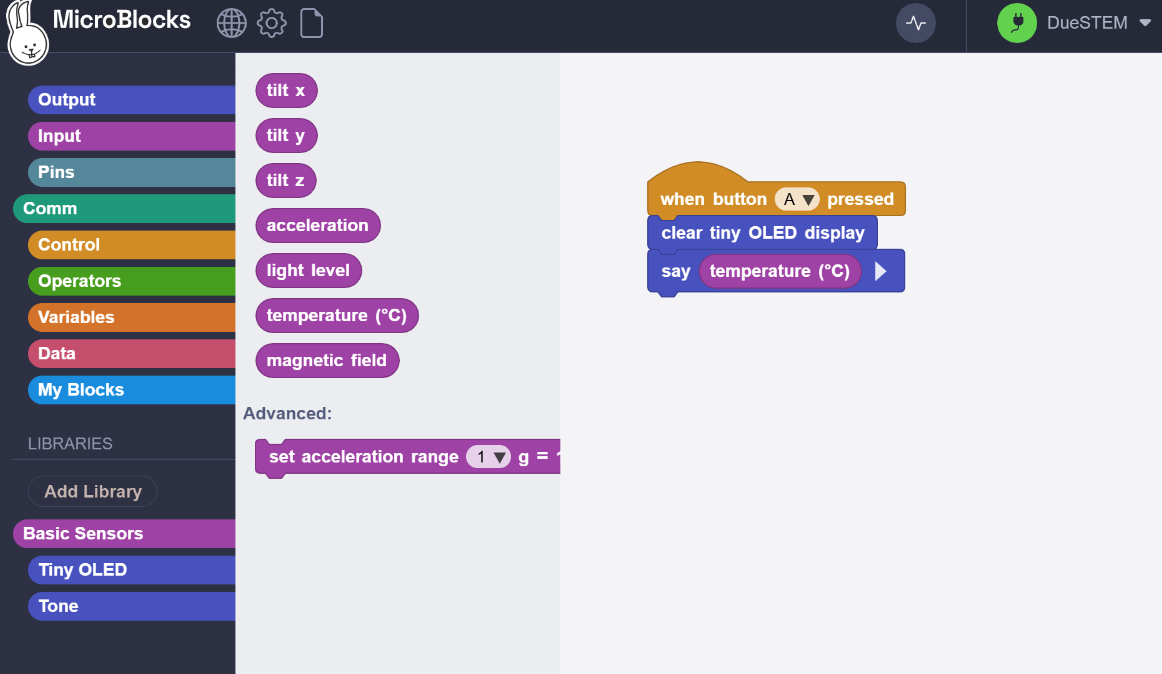
Temperature reading from DueSTEM in Microblocks is 0 with “say temp.” And does not appear on Tiny OLED as I see no number display blocks for DueSTEM library. Temperature comes from Basic Sensors library as DueSTEM does not offer Temperature in its library.
MicroBlocks : Code link
This is not correct as your project should automatically add DUELink Edu lib. Everything you need is in there.
If you need to add it manually then it’s is under “work in progress”.
Are you using pilot micro blocks? You can tell from the link. It should include -pilot
By the way, the edu lib is a couple of weeks old and so it is not reflected in the micro blocks docs yet.
But the project samples we provide are more recent. https://duestem.duelink.com/
Anyway, what libs do you see added when you first connect a brand new project?
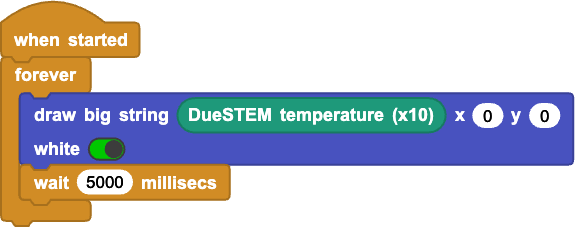
Add the “DUELInk Edu” library and try this script. (Untested since I’m traveling and don’t have a board with me):
The DUELink Edu library is in the “Work in Progress” folder whey you run the pilot release. If the board is connected and you create a new project, that library will be loaded automatically.
1 Like