@Dat_Tran Removing only the try catch statements but leaving all of the code within the try statement intact. I will make a short project today and send it to you, however I have some other tasks that may distract me for some time so it may be a few hours.
We reviewed the extension and couldn’t find any issues on our side that would cause this problem.
It’s possible that, during the migration, a desktop assembly was accidentally added. Some desktop libraries use generic features that TinyCLR does not support yet (we have limitation page)
Since your new, simplified project works, you can narrow the issue down by comparing it with your original project. If you prefer, you can also share the project with us, and we’ll be happy to investigate it. It should be straightforward for us as long as we can reproduce the issue.
Migrating from TinyCLR 2.x to 3.x is expected to require minimal changes for most customers. However, unexpected issues can still happen, and that’s exactly why we’re here to help :d
I will make a short project today and send it to you, however I have some other tasks that may distract me for some time so it may be a few hours.
Great! We’re curious to find out what’s causing it too.
@Dat_Tran I sent in a large amount of information via email, however I’ll also post the images and background information here as well in case anyone else is experiencing the same issue.
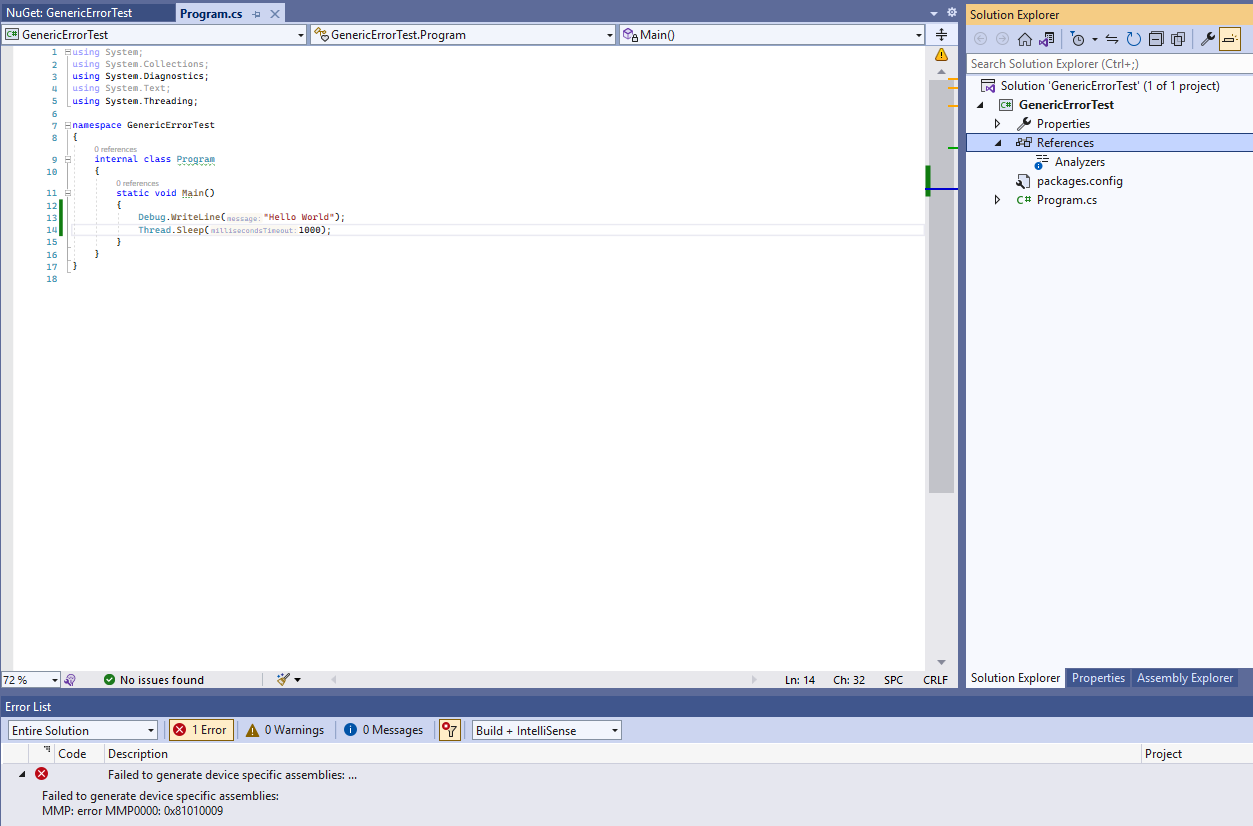
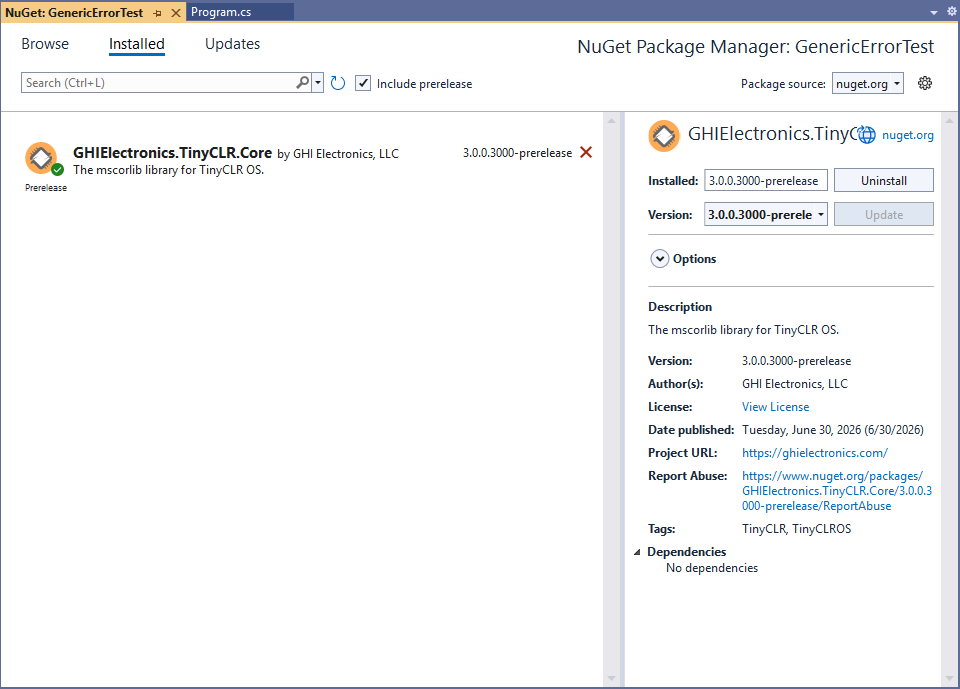
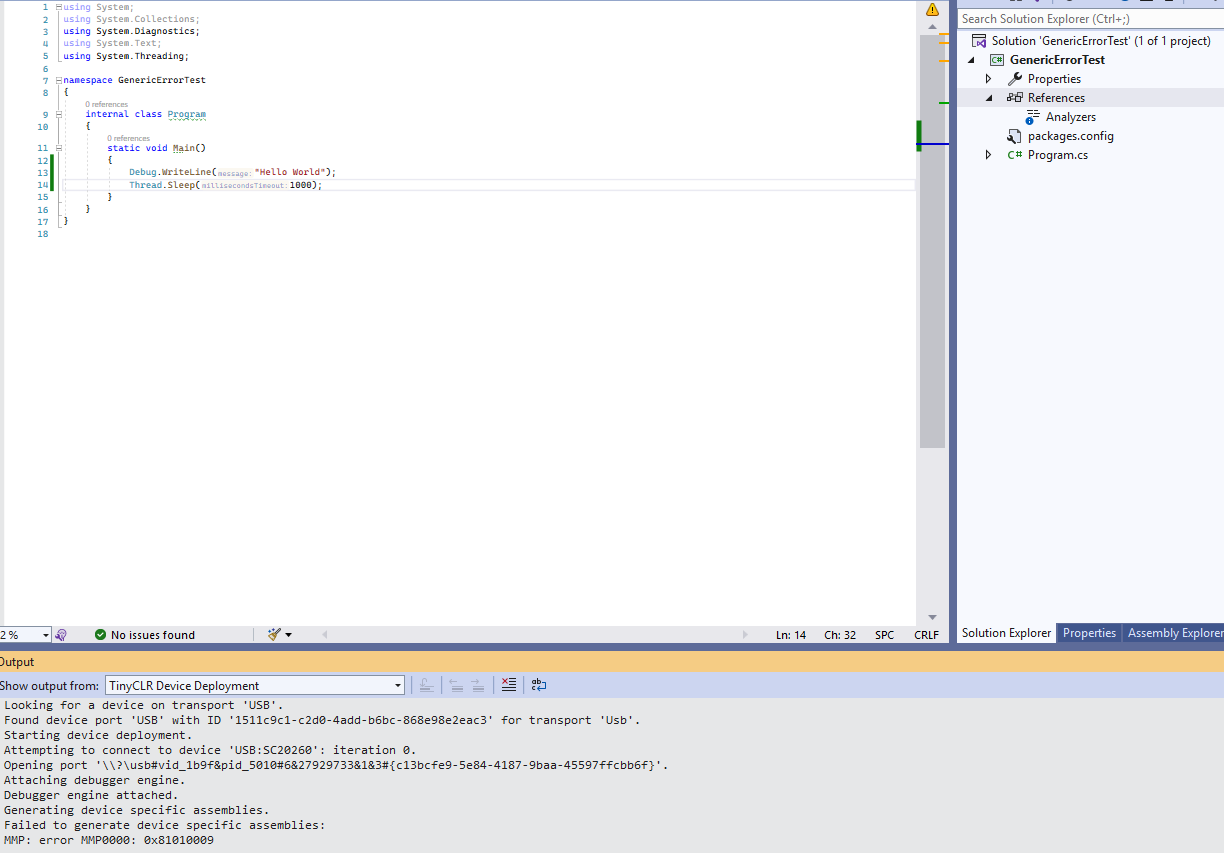
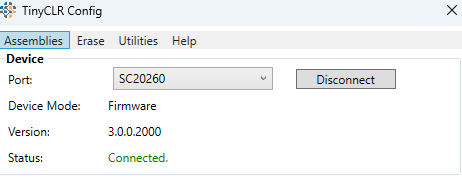
The project simply writes “Hello World” to the debug line every second. The project builds just fine, but generates the error when attempting to deploy to a SCM20260E processor which is running “sitcore-sc20-firmware-v3.0.0.2000.ghi”. I also attached screenshots showing the only .cs file in the project, the error code, the only reference is the TinyCLR Core version 3.0.0.3000, the error shown both in the error list and output, and the TinyCLR Config tool showing that the processor is running firmware version 3.0.0.2000.
The only peculiarity is that I am forced to use an older version of the TinyCLR Config tool, since both versions 3.0.0.2000 and 3.0.0.3000 instantly close when I try to open them. The exit code presented is hard to see since the command window closes so quickly, but slowing down a recording it reads as 0xffffffff. Therefore I used my older TinyCLR Config tool version 2.3.0.1000 to install firmware version 3.0.0.2000 on my SCM20260E. Hopefully that does not cause any issues with deploying the application, but I thought you would appreciate knowing about that issue as well.
I don’t see the email yet.
Please send to dat.tran@ghi…
Also, update firmware is not enough. The error comes from extension. Did you update the VS extension?
@Dat_Tran Apologies, I sent it to Gus and got mixed up with who I sent it to since we had been messaging on the forum. Forwarding it to you now.
I don’t believe that I updated the extension since it wasn’t on “The short version” instructions here:
I’ll update it and let you know if that fixes the issue.
That was the issue. I updated the extension and now everything is working. Apologies for forgetting a simple step. Might be worth adding to the tutorial for migrating from v2 to v3 in order to ensure that it makes it onto users’ mental checklist.
I will now resume getting the application into a state where it does not need to validate the certificate for an HTTPS request in order to test the functionality and will let you know the result!
No matter what the cause turns out to be, we’re always happy when our customers help uncover a problem. If you find anything else, please let us know—we’re always happy to investigate.
yes, this is our problem. We will take care of it.
The main thing now is: HTTPS request without cert, share the result after your testing
I am having the following issue:
my HttpWebRequest is defined here:
using (var req = WebRequest.Create(url) as HttpWebRequest)
however after that line req goes from ‘null’ to “Could not evaluate expression”
I tried to change it to
var req = (HttpWebRequest)WebRequest.Create(url);
and I am having the same issue. I am unsure why the variable is not being created correctly when the line at the top of this comment was working with the old version of the firmware (2.2.0.5000). I am unsure if this even is a real issue, as the code does not crash, but it will throw an error when I try to read the response stream later on in the function.
Also, after running the line:
var res = req.GetResponse() as HttpWebResponse;
the value of res is {System.Net.HttpVersion} which is odd since it should be an HttpWebResponse
Same result using your test code line for line after an ethernet connection is established and simply commenting out
var body = ReadBodyText(resp, 256);
Console.WriteLine(" Body[0..120]: " + (body.Length > 120 ? body.Substring(0, 120) : body));
This is full project that tested your issue, also use “using (var req = WebRequest.Create(url) as HttpWebRequest)” as you wanted.
It works for me. My project uses Ethernet, and url is https://google.com
If it does not work for you, send me your simple project.
You need to make sure if the board really connects to internet, what are you are trying…
using System;
using System.IO;
using System.Net;
using System.Security.Authentication;   // SslVerification (TinyCLR-only, after the managed fix)
using System.Security.Cryptography.X509Certificates;
using System.Text;
using System.Threading;
using GHIElectronics.TinyCLR.Devices.Gpio;
using GHIElectronics.TinyCLR.Devices.Network;
using GHIElectronics.TinyCLR.Devices.Spi;
using GHIElectronics.TinyCLR.Pins;

namespace Device_SC20260 {
    internal class Program {

        // Public HTTPS endpoint to hit. Any https site works; the point is the
        // device has no root CA for it.
        const string URL = "https://www.google.com/";
        // =============================================================

        const int LED    = SC20260.GpioPin.PH11;
        const int BUTTON = SC20260.GpioPin.PB7;

        static GpioPin led;
        static GpioPin button;

        static void Main() {
            var controller = GpioController.GetDefault();
            led = controller.OpenPin(LED);
            button = controller.OpenPin(BUTTON);
            led.SetDriveMode(GpioPinDriveMode.Output);
            button.SetDriveMode(GpioPinDriveMode.InputPullUp);

            // Same gate as the template: blink until the button is pressed, so a
            // failing test never takes the system down on every boot.
            while (true) {
                led.Write(led.Read() == GpioPinValue.Low ? GpioPinValue.High : GpioPinValue.Low);
                if (button.Read() == GpioPinValue.Low) break;
                Console.WriteLine("Press button to start. Device: " + GHIElectronics.TinyCLR.Native.DeviceInformation.DeviceName);
                Thread.Sleep(150);
            }

            StartEthernetNetwork();
            RunSslTest();
        }

        static void RunSslTest() {

            // ----- No root CA, accept any certificate (THE FIX) -----

            Console.WriteLine("");
            Console.WriteLine("--- No root CA + SslVerification.None  (expect SUCCESS after the fix) ---");
            try {
                //var req = (HttpWebRequest)WebRequest.Create(URL);
                using (var req = WebRequest.Create(URL) as HttpWebRequest)
                {
                    req.Method = "GET";
                    req.Timeout = 15000;
                    req.ReadWriteTimeout = 15000;
                    req.KeepAlive = false;
                    req.UserAgent = "TinyCLR-TestSSL/1.0";

                    // >>> AFTER THE MANAGED FIX + Networking.Http REPACK, UNCOMMENT: <<<
                    req.SslVerification = SslVerification.None;

                    using (var resp = (HttpWebResponse)req.GetResponse())
                    {
                        Console.WriteLine("  SUCCESS: " + (int)resp.StatusCode + " — certificate accepted with NO root CA");
                        var body = ReadBodyText(resp, 256);
                        Console.WriteLine("  Body[0..120]: " + (body.Length > 120 ? body.Substring(0, 120) : body));
                    }
                }
            }
            catch (Exception ex) {
                Console.WriteLine("  FAILED: " + ex.GetType().Name + ": " + ex.Message);
            }
        }

        static string ReadBodyText(HttpWebResponse resp, int maxBytes) {
            var stream = resp.GetResponseStream();
            var buffer = new byte[maxBytes];
            var total = 0;
            while (total < buffer.Length) {
                var n = stream.Read(buffer, total, buffer.Length - total);
                if (n <= 0) break;
                total += n;
            }
            return Encoding.UTF8.GetString(buffer, 0, total);
        }

        static bool phyReady = false;

        const string EMAC_API_NAME = "GHIElectronics.TinyCLR.NativeApis.STM32H7.EthernetEmacController\\0";

        const int RESET = SC20260.GpioPin.PG3;
        static GpioPin resetPin;
        static void StartEthernetNetwork()
        {
            var controller = NetworkController.FromName(EMAC_API_NAME);


            var gpioController = GpioController.GetDefault();
            if (RESET > 0)
            {
                // Do external Phy reset
                resetPin = gpioController.OpenPin(RESET);
                resetPin.SetDriveMode(GpioPinDriveMode.Output);

                resetPin.Write(GpioPinValue.Low);
                Thread.Sleep(100);

                resetPin.Write(GpioPinValue.High);
                Thread.Sleep(100);
            }

            var settings = new EthernetNetworkInterfaceSettings
            {
                // Locally-administered MAC (bit 1 of first byte set) -- won't clash on your LAN.
                MacAddress = new byte[] { 0x00, 0x04, 0x00, 0x00, 0x00, 0x00 },
                DhcpEnable = true,
                DynamicDnsEnable = true,
            };

            settings.Address = new IPAddress(new byte[] { 192, 168, 86, 100 });
            settings.SubnetMask = new IPAddress(new byte[] { 255, 255, 255, 0 });
            settings.GatewayAddress = new IPAddress(new byte[] { 192, 168, 86, 1 });
            settings.DnsAddresses = new IPAddress[] { new IPAddress(new byte[] { 75, 75, 75, 75 }), new IPAddress(new byte[] { 75, 75, 75, 76 }) };

            controller.SetInterfaceSettings(settings);
            controller.SetCommunicationInterfaceSettings(new BuiltInNetworkCommunicationInterfaceSettings());
            controller.SetAsDefaultController();

            controller.NetworkAddressChanged += NetworkController_NetworkAddressChanged;
            controller.NetworkLinkConnectedChanged += NetworkController_NetworkLinkConnectedChanged;


            controller.Enable();

            Console.WriteLine("Waiting for link...");
            while (!phyReady) Thread.Sleep(100);
            Console.WriteLine("Link up. Waiting for DHCP...");

            while (true)
            {
                var ip = controller.GetIPProperties();
                if (ip.Address != null && ip.Address.ToString() != "0.0.0.0")
                {
                    Console.WriteLine("IP  : " + ip.Address);
                    Console.WriteLine("GW  : " + ip.GatewayAddress);
                    if (ip.DnsAddresses != null && ip.DnsAddresses.Length > 0)
                        Console.WriteLine("DNS : " + ip.DnsAddresses[0]);
                    break;
                }
                Thread.Sleep(500);
            }

        }

        private static void NetworkController_NetworkLinkConnectedChanged(NetworkController sender, NetworkLinkConnectedChangedEventArgs e) {
            phyReady = e.Connected;
            Console.WriteLine("Phy status " + phyReady);
        }

        private static void NetworkController_NetworkAddressChanged(NetworkController sender, NetworkAddressChangedEventArgs e) {
            var ip = sender.GetIPProperties();
            Console.WriteLine("Address changed: " + ip.Address);
        }
    }
}
I’m sure that the board is connected to the internet, I’m sending it the command to make the Https request via a TCP client connection to one of our servers. Instead of calling my usual function that downloads a .tca update file from one of our servers, I called RunSslTest() instead, using “https://www.google.com/” and the result was the same, req could not be evaluated after executing the line
using (var req1 = WebRequest.Create(url) as HttpWebRequest)
and when I tried to execute
var resp = (HttpWebResponse)req.GetResponse()
I saw the following:
####Exception System.InvalidOperationException - CLR_E_INVALID_OPERATION (1) ####
#### Message:
#### GHIElectronics.TinyCLR.Devices.Network.Provider.NetworkControllerApiWrapper::GetHostByName [IP: 0000] ####
#### System.Net.Dns::GetHostEntry [IP: 0024] ####
#### System.Net.HttpWebRequest::EstablishConnection [IP: 00ed] ####
#### System.Net.HttpWebRequest::SubmitRequest [IP: 0019] ####
#### System.Net.HttpWebRequest::GetResponse [IP: 000c] ####
#### GHI_Framework.SystemUpdater::DownloadUpdateFile [IP: 00a6] ####
#### JX200Pro.CommandParser::ProcessUpdateCommand [IP: 009d] ####
#### JX200Pro.CommandParser::ProcessTCPMessage [IP: 00bb] ####
#### JX200Pro.MainThread::TcpDataReceived [IP: 0043] ####
#### GHI_Framework.TcpClient::CheckForTcpData [IP: 01e0] ####
#### JX200Pro.MainThread::Main [IP: 00b7] ####

Exception thrown: ‘System.InvalidOperationException’ in GHIElectronics.TinyCLR.Devices.Network.dll

#### Exception System.Net.WebException - 0x00000000 (1) ####
#### Message:
#### System.Net.HttpWebRequest::GetResponse [IP: 00d3] ####
#### GHI_Framework.SystemUpdater::DownloadUpdateFile [IP: 00a6] ####
#### JX200Pro.CommandParser::ProcessUpdateCommand [IP: 009d] ####
#### JX200Pro.CommandParser::ProcessTCPMessage [IP: 00bb] ####
#### JX200Pro.MainThread::TcpDataReceived [IP: 0043] ####
#### GHI_Framework.TcpClient::CheckForTcpData [IP: 01e0] ####
#### JX200Pro.MainThread::Main [IP: 00b7] ####

Exception thrown: ‘System.Net.ProtocolViolationException’ in GHIElectronics.TinyCLR.Networking.Http.dll

FAILED: WebException:
I’ll try and just use the project you provided directly in place of implementing a few functions into my larger project and let you know how that goes, however I’ll have to make a few changes since I don’t have the buttons available to make the ethernet connect.
@Dat_Tran Success! While I was unable to receive any response from google.com, I was able to download a .tca update file from one of our servers after restarting apache on it. I believe that the service may have been having some issues, however it is working perfectly as I wanted it to now! I’ll let you know if I have any further issues!
1 Like
Yes, we forgot other side (your server) :))
Just said if any other issue.
Wait, still hidden issue. Better if you find out why now.
The snippet that I posted with the web exception is what happens when I try and get data from google.com. I can try and troubleshoot it tomorrow but my work day is about over right now.
1 Like
@Dat_Tran if I use https://www.google.com/ then I get a protocol violation exception, but if I ping google.com in my computer’s command window, I get an IP of 173.194.216.113. Then if I use https://173.194.216.113 as my url it works.
Hi,
Could you perform these two tests?
1. After your board has connected to the Internet, run only the following code:
static void DoTestDnsTemp()
{
    try
    {
        var entry = Dns.GetHostEntry("ghielectronics.com");
        Console.WriteLine("GetHostEntry => Good");

    }
    catch (Exception ex)
    {
        Console.WriteLine("DNS threw (expected): " + ex.Message);
    }
}
Do you get an exception?
- If you do not get an exception , then something in your larger project is likely causing the issue.
- If you do get an exception , please continue with step 2.
2. TinyCLR 3.0 includes a feature that allows your application to run on your PC. Change the project property as shown below:
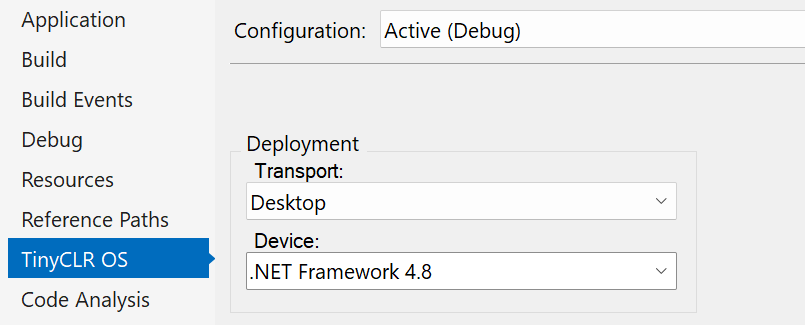
This will run your code using your PC’s networking stack and resources.
- If you still get the exception on your PC , then the issue is likely related to your network.
- If it works on your PC but throws an exception on TinyCLR , then I’ll need to look at a simple project that reproduces the problem.
Please create a minimal project that reproduces the issue and send it to me. There is probably something related to the DNS configuration that I need to investigate but haven’t seen yet because it isn’t included in the code you’ve shared.
Ran the tests:
Results of test 1:
Trying to step over the line
var entry = Dns.GetHostEntry(“ghielectronics.com”);
results in the following error:
#### Exception System.InvalidOperationException - CLR_E_INVALID_OPERATION (1) ####
#### Message:
#### GHIElectronics.TinyCLR.Devices.Network.Provider.NetworkControllerApiWrapper::GetHostByName [IP: 0000] ####
#### System.Net.Dns::GetHostEntry [IP: 0024] ####
#### GHI_Framework.EthernetController::DoTestDnsTemp [IP: 0008] ####
#### JX200Pro.MainThread::Main [IP: 00a8] ####
Exception thrown: ‘System.InvalidOperationException’ in GHIElectronics.TinyCLR.Devices.Network.dll
DNS threw (expected): Exception was thrown: System.InvalidOperationException
Results of test 2:
Works on my PC despite throwing an exception on TinyCLR
I’ll make a small project that reproduces the issue and send it to you.